Practical guide
How to book a Madeira trail in SIMplifica, step by step
Trails covered by the IFCN system require an online reservation through SIMplifica, even if you are exempt from the fee. Not every official PR trail is covered. This guide shows screenshots of the public booking pages and explains what to do next.
How do I get a ticket for a Madeira PR trail?
Open the official SIMplifica service. If your trail is available in the IFCN system, select it, then choose a date and entry time. Sign in or create an account, add participants and follow the portal's instructions to finish. Pay if required, and save the tickets or confirmation offline.
SIMplifica · 24 September 2026
See the real portal screens
Our screenshots of the public SIMplifica pages, captured on 24 September 2026. Open an image to enlarge it. PR 8 shows how the form works; it does not mean places are currently available. We did not sign in or make a payment.
- 1
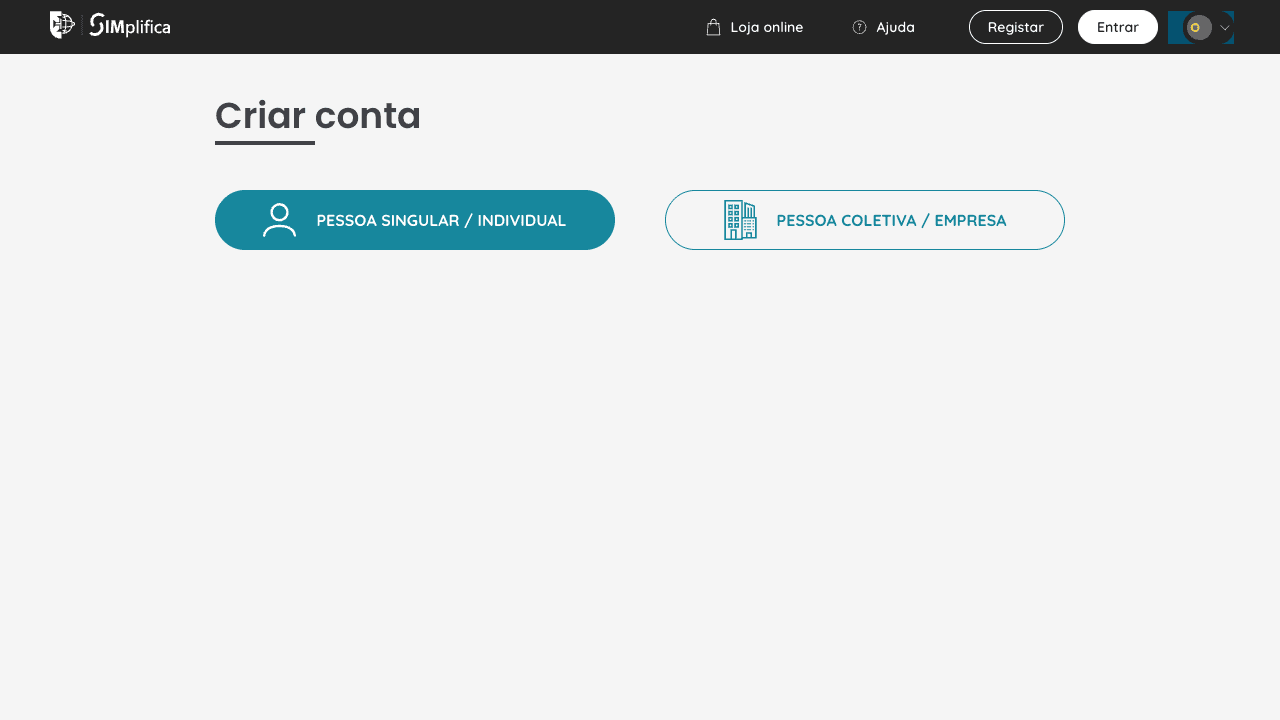
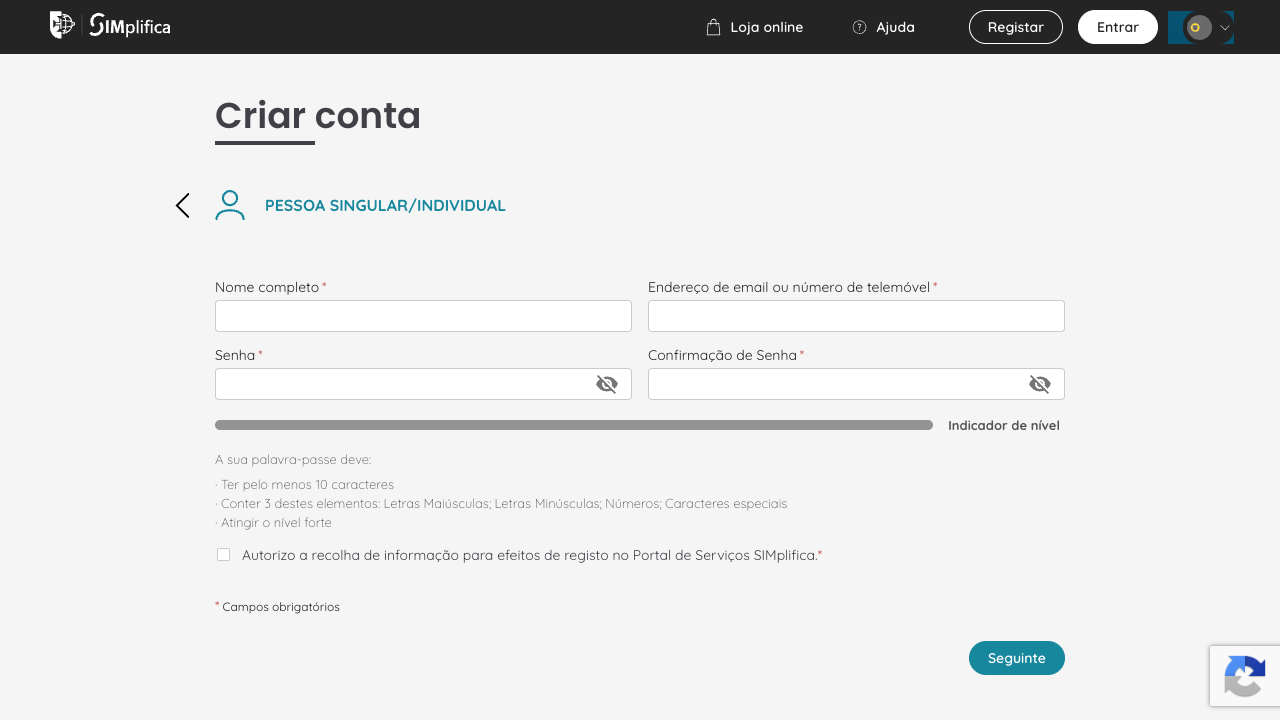
Choose an individual account
On the registration page choose Pessoa Singular / Individual, not Pessoa Coletiva / Empresa.
- 2
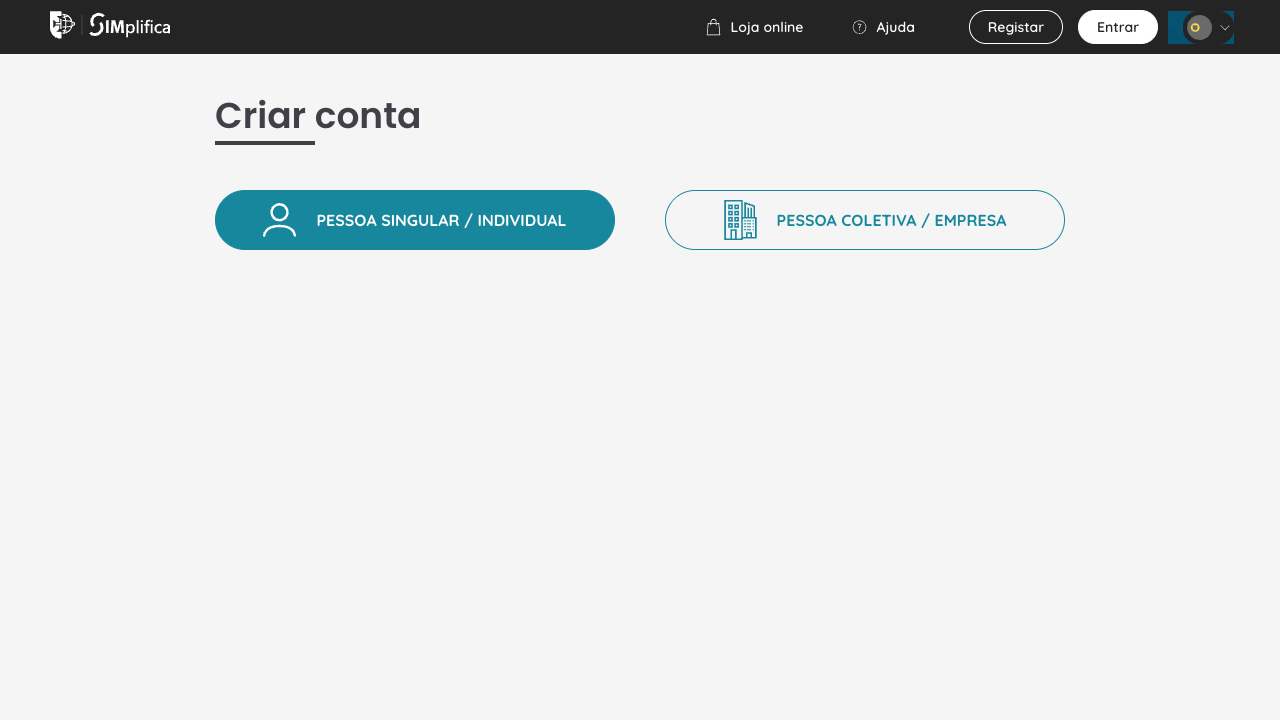
Complete the registration form
Enter your name, e-mail or phone number and a password. The password needs at least 10 characters and must meet the on-screen rules.

- 3
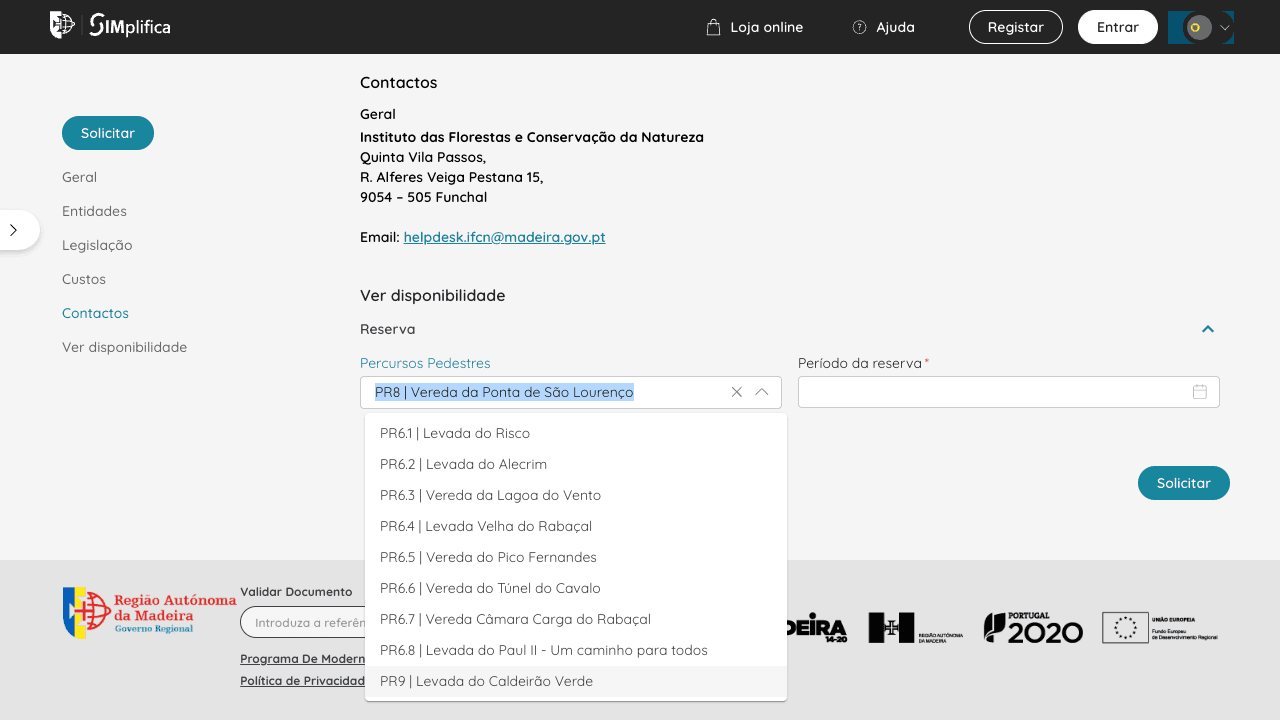
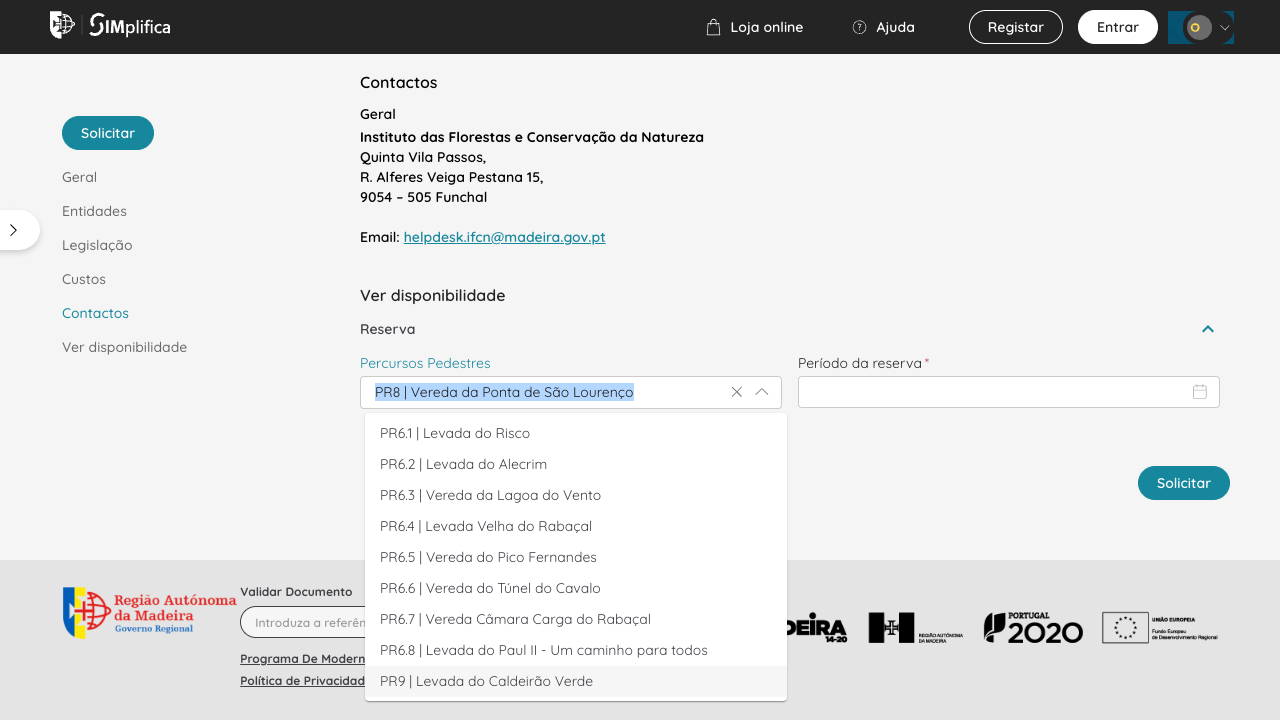
Check trail availability
On the official service page choose a route under Percursos Pedestres. If it is absent, check its status and manager with IFCN.
- 4
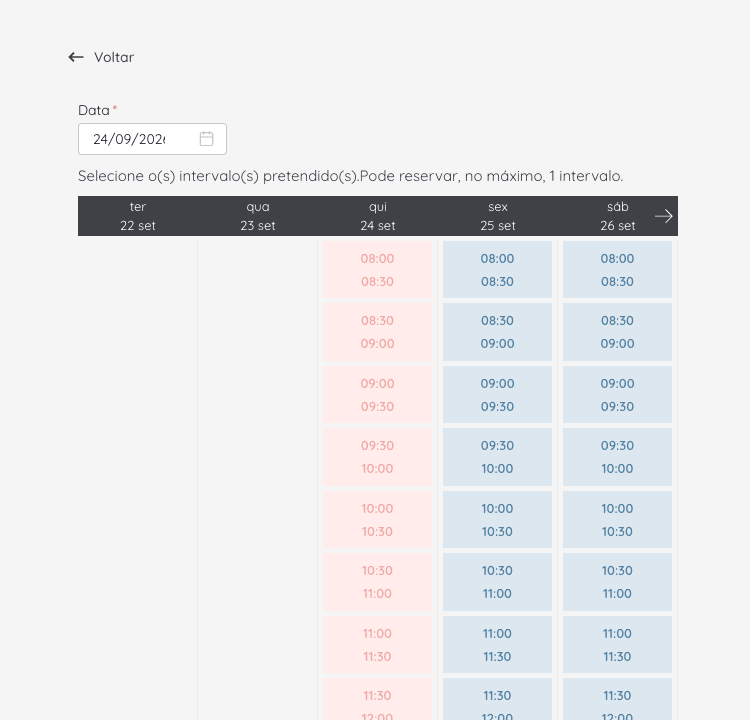
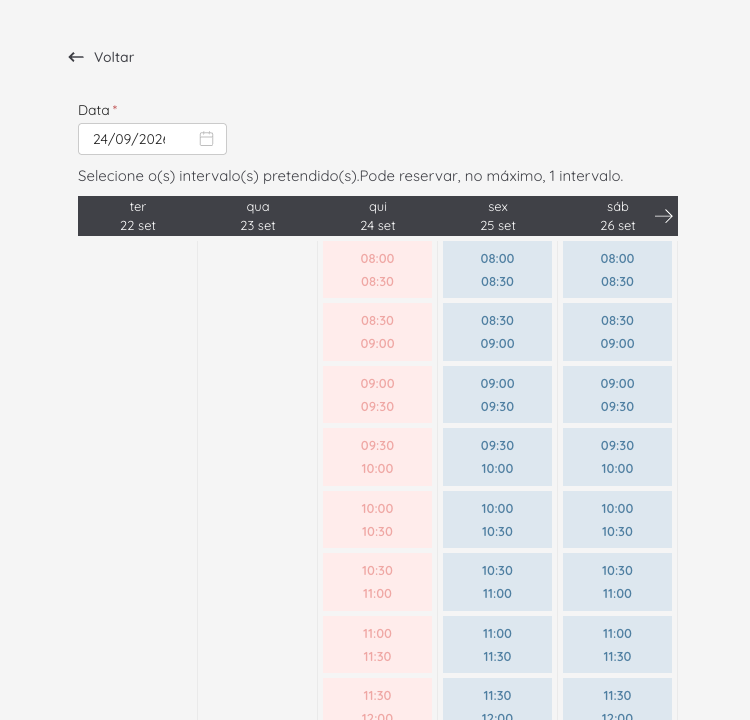
Choose a date and entry slot
Open Período da reserva to view dates and 30-minute entry slots. Availability can change.
This video is hosted by SIMplifica and may show an older interface. Follow the live booking form if the screens differ.
What to prepare before booking
Booking applies to classified trails managed by IFCN and available in SIMplifica, not automatically to every PR trail. Fee-exempt visitors must still reserve. There is no on-site booking or payment.
Have your e-mail or phone number, participant details and a payment method accepted by the portal ready. A new account password needs at least 10 characters. Check the IFCN trail status before choosing a slot.
The standard visitor fee is €4.50 for an individual trail other than the full PR 1 route. Full PR 1 has a separate price. When booking several trails, the portal may automatically apply a cheaper combined tariff, but each trail and slot still needs a reservation.
Booking step by step
1. Open the official service. Under Ver disponibilidade choose Percursos Pedestres, the trail, then Período da reserva with your date and 30-minute entry slot.
2. To finish the booking, sign in or create a Pessoa Singular / Individual account. Confirm the account as the portal instructs.
3. After signing in, enter participants and the correct categories. Review the summary, price and payment methods shown. Do not invent a NIF number: if you do not have a Portuguese NIF, follow the live form's guidance or contact support.
4. Finish in SIMplifica and save the tickets and invoice or confirmation offline. We do not show screenshots of this signed-in part because we did not place a test booking or pay.
Participant categories and the NIF field
Exemptions include children up to 12, people with at least 60% certified disability, and residents of the Autonomous Region of Madeira. An exemption from the fee is not an exemption from booking. Check eligibility and documentation in the IFCN FAQ.
If booking for a group, add every participant to the relevant slots. NIF and category requirements depend on individual circumstances; follow the form's labels and ask SIMplifica if unsure.
The ticket and QR checks on the trail
After completing the process, check that you received tickets and an invoice or confirmation. Save the documents offline and keep them handy for checks.
A reservation does not reopen a closed trail. Check the current IFCN status before you go. A missing trail in the portal may be closed or outside the IFCN booking system.
A change of date or refund is generally possible only if the authorities officially close or restrict the trail. Contact IFCN promptly, check the 10-working-day deadline in its FAQ, and keep your tickets and invoice. Personal changes of plan, a mistaken date or rain alone do not qualify.
If you receive a cancellation e-mail for non-payment but already have tickets and an invoice, compare the reference numbers. The message may concern an earlier unfinished attempt.
Where to get help
IFCN (fees and trails): +351 291 145 590, helpdesk.ifcn@madeira.gov.pt.
SIMplifica support: +351 800 29 90 90 or WhatsApp +351 926 155 465, weekdays 09:00-18:00.
Check the trail details
Open a trail page to check its status, access and conditions before setting out.
GuidesRelated guides
Official sources
Legal basis: DLR 24/2022/M, Portaria 801/2025, Portaria 48/2026.
We checked the public SIMplifica screens on 24 September 2026. The signed-in part is described from official guidance; we did not make a test payment. The portal, prices and availability may change. Check current information in SIMplifica and IFCN.
Check the trail status before you go